NovoMagic Plus: Your Next-Generation Cloud Reanalysis Platform
Introduction
NovoMagic Plus is Novogene’s next-generation, cloud-based platform for interactive, customisable sequencing data analysis. It is available free of charge for all standard mRNA-seq projects with a reference genome that have undergone Novogene bioinformatics analysis.
With NovoMagic Plus, you can:
- Explore your data through an upgraded, more intuitive interface.
- Re-analyse results by regrouping samples, adjusting parameters (e.g., p-value thresholds), and editing figures such as Venn diagrams.
- Dive deeper with over a dozen specialised analysis modules for expression profiling, DGE, pathway enrichment, and more.
Meet Novi – Your AI Plotting Assistant
NovoMagic Plus introduces Novi, an AI-powered assistant that helps you visualise and interpret your data with smart tools like BioPlot and Img2Code. Novi can generate heatmaps, volcano plots, and other visualisations on command – even from compatible datasets you upload — helping you communicate your results faster and more clearly.

Why NovoMagic Plus?
- Modernised interface for smoother navigation and analysis.
- Flexible customisation to fit your research needs.
- AI-powered plotting for rapid, high-quality visuals.
- Continuous development with new features planned for release.
Whether you’re a seasoned bioinformatician or a researcher new to data analysis, NovoMagic Plus makes sequencing data exploration faster, smarter, and more accessible than ever.
Already a Novogene CSS user? Access NovoMagic Plus directly from your CSS account — or contact us to request a demo project.
Features of NovoMagic



Toolkits of NovoMagic
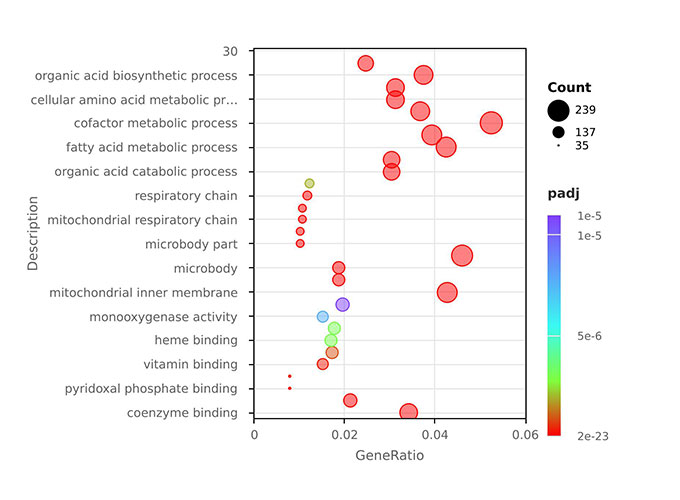
GO PlotPerform GO enrichment reanalysis with customisable parameters
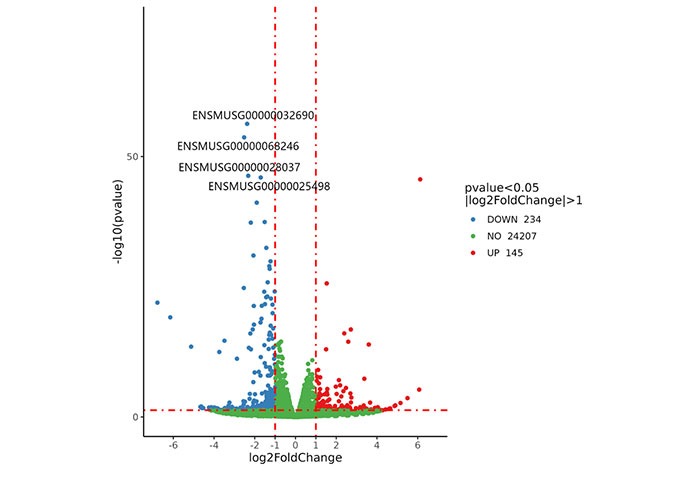
Volcano plotsCreate volcano plots with
adjustable thresholds and dynamic labelling to highlight key genes
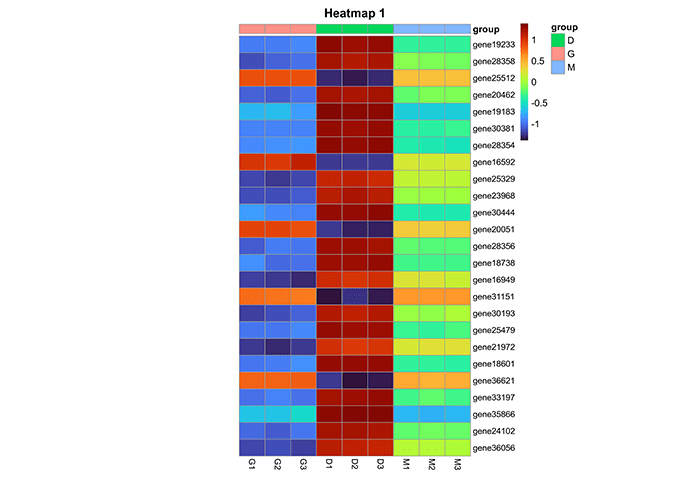
HeatmapsGenerate high quality
heatmaps and other visualisations instantly from existing results
And more…
Ready to explore NovoMagic Plus?
Request a Demo Account by emailing us at info@novogene-europe.com and our team will get in touch.
If you are a Novogene customer, simply log in to your Customer Service System (CSS) account to access NovoMagic Plus directly. You can request a demo from there to get hands-on with its new interface, and interact with our AI assistant, Novi.
Introduction to NovoMagic: Your AI-Powered Bioinformatics Assistant
Discover its refreshed, intuitive interface, upgraded features, and our newest star — Novi, the built-in AI assistant for smart plotting and data visualisation. Learn how to access NovoMagic Plus through your Customer Service System (CSS) account and see real examples of how it can enhance your RNA-seq analysis workflow.
More resources here:
- 1.Welcome to NovoMagic
- 2. Novi User Guide
- 3. Correlation Analysis
- 4. Screening Target Information Using Gene ID
Getting Started with NovoMagic Plus – User Guide
This user guide walks you through the key steps of using NovoMagic Plus — from navigating the interface and managing projects to running analyses and visualizing results. Learn how to work with Novi, our AI assistant, to speed up your workflow and create publication-ready outputs with ease.
NovoMagic & Novi – Frequently Asked Questions
